

Documents
Text Blocks
A library that thinks ahead: reference blocks update automatically everywhere they're used, placeholders resolve gender and grammatical case, and attachments append themselves.
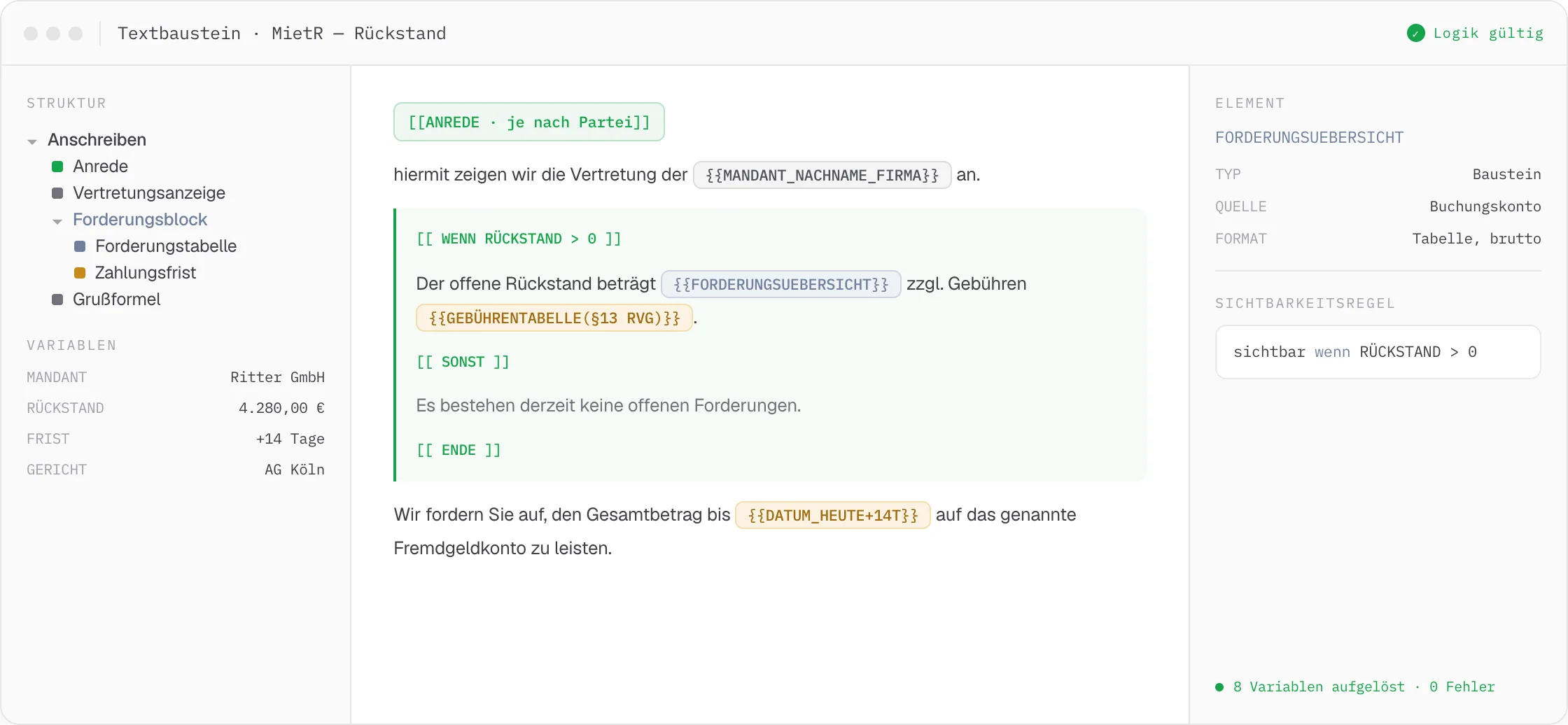
At DEPLAW, templates are closely linked to data extraction, party data, and workflows: extracted data points, stored party information, and deadlines can all be embedded directly as type-safe placeholders. The result is submissions that read as fluently as hand-written text — not like text blocks stitched together.
The same salutation, every constellation
“Dear Ms. {{LastName}}” or “Dear Mr. {{LastName}}” are generated from the very same block – DEPLAW automatically resolves salutation, gender, and grammatical case based on the stored party data, even when a single sentence involves multiple parties of different genders. There is no need for a separate copy of the block for each constellation.
Attachment management
The right attachments for a template can be stored directly within the block – by tag or by document name from the case history. Attachments can be tied to conditions, such as “only attach if a reminder notice exists,” and attachment titles can already be set within the block to ensure correct naming when sent via beA. There’s no need to add them manually on every use.
As a step within automated BPMN workflows, templates create documents completely without manual intervention – from case intake through to dispatch.
01
Centrally managed
All templates are created and maintained in a central library – organized by category and tag. One change is enough to update a block in every document that references it.
Categories · tags · search
02
Reference blocks
Every block gets a freely assignable ID and can reference other blocks. If a reference block changes – for example to reflect current case law – every block that includes it is automatically up to date.
Custom IDs · nested references
03
Gender & placeholders
Placeholders automatically resolve salutation, gender, and grammatical case for every party involved – nominative, genitive, dative, accusative, for every gender combination. One block covers every variant, with no copies to maintain.
Nominative · genitive · dative · accusative
04
Logic & conditions
The FEEL language expresses conditions for paragraphs, numeric and date comparisons, and nesting. Prebuilt queries cover common cases, with access to data extraction and party data.
FEEL · prebuilt queries
Example · Reminder letter with conditional attachments
One block that resolves gender, condition, and attachment on its own.
Salutation and case reference adapt automatically, the condition logic decides on extra paragraphs, and the right attachment appends itself.
Related Features
Pairs well with Text Blocks.
Documents
Text Generator
From template to ready-to-send PDF – with data points pulled from the case file, automatic letterhead, and an AI that already knows the case.
Documents
Dynamic Forms
Here, a form isn't an input field — it's the trigger for workflow, document, and payment in a single step.
Automation & AI
Workflow Editor
Draw tasks, gateways, and events by drag and drop. What you model becomes executable logic – from beA classification to batch dispatch.