

Finance
Transfers
Created directly from the case file, authorized through multiple approval levels, and executed via Konfipay or CSV export — settlement payments, client funds, and court costs can be fully automated, with no human interaction.
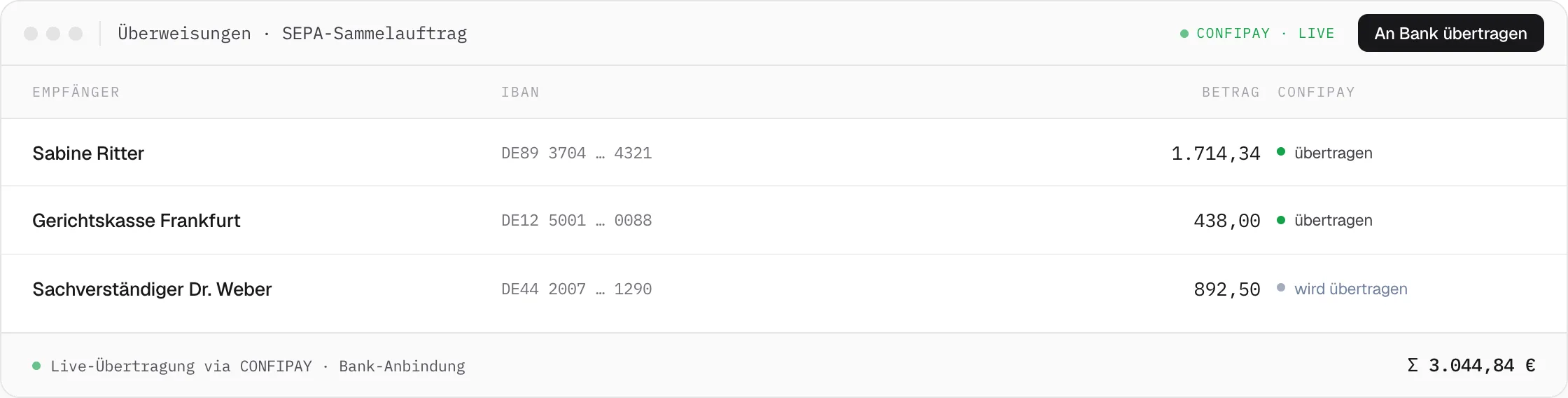
Payment processing is still a system break in many law firms and insurance companies today: amounts from the case file are transferred manually into banking software, and approvals run by email or through separate tools. The transfers feature closes this gap — orders are created directly in the case file and either executed via direct Konfipay integration or exported as a CSV file for common banking programs.
Compliance Without External Approval Software
Tiered approvals are mandatory when processing claims and legal cases at scale. DEPLAW fully covers these requirements, including a rolling 6-month check per recipient IBAN — compliance for insurers and law firms, with no additional external approval software. Every action is logged in the audit-proof process history.
Three Control Levels Instead of a Black Box
Not every payment needs the same level of scrutiny: batch approval suits routine small amounts, the threshold template automatically routes larger individual amounts to a supervisor, and the rolling 6-month check per recipient IBAN catches anomalies that a purely case-by-case review would miss.
01
Integrated in the Case File
The case handler creates the transfer order directly in the case file — with access to all stored bank accounts, party data, and amounts from the claims table. No switching to banking software, no export.
Business & client funds accounts separated · multi-entity
02
Multi-Level Authorization
Three control levels apply automatically: batch approval for an entire account with one click, an individual threshold template above which an order automatically goes to a supervisor, and a rolling 6-month check of the total per recipient IBAN.
Threshold · individual approval · 6-month check
03
Two Execution Paths
Through direct Konfipay integration, the transfer is sent to the bank immediately, with no manual export. Alternatively, DEPLAW exports the orders as a CSV file, separated by account, for StarMoney and similar programs, with authorization handled as usual in the banking software.
Konfipay API · CSV export
04
Fully Workflow-Integrated
Triggered as a BPMN service task: settlement payments, client funds disbursements, and court cost invoices are executed automatically as soon as the conditions defined in the workflow are met.
BPMN service task · no human interaction
Example · Settlement Payment After Agreement
From the case file to an executed transfer – no banking software.
After an out-of-court settlement, DEPLAW triggers the settlement payment directly from the case file and authorizes it automatically according to the stored threshold logic.
Three Payment Types, One Order Path
Every transfer, authorized the same way.
Settlement payment, client funds disbursement, or court costs – every order goes through the same authorization logic, regardless of the execution path.
Related Features
Pairs well with Transfers.
Finance
Bookkeeping & Client Funds
Incoming payments, account posting, and client funds disbursement run in a single DATEV-compliant bookkeeping process – including Konfipay import and cross-case controlling.
Finance
Payment Orders
From the automatically generated payment order application to the enforcement order, the entire court payment order procedure runs without manual intervention.
Finance
Payment Interfaces
Clients and debtors pay by credit card, PayPal, Apple Pay, or SEPA — the payment lands automatically in the case file and triggers the next workflow step.