

Case File & Inbox
Online Case File
The central, fully mobile-optimized collaboration space between firm and client – documents, status, tasks, and digital powers of attorney instead of unwieldy email traffic.
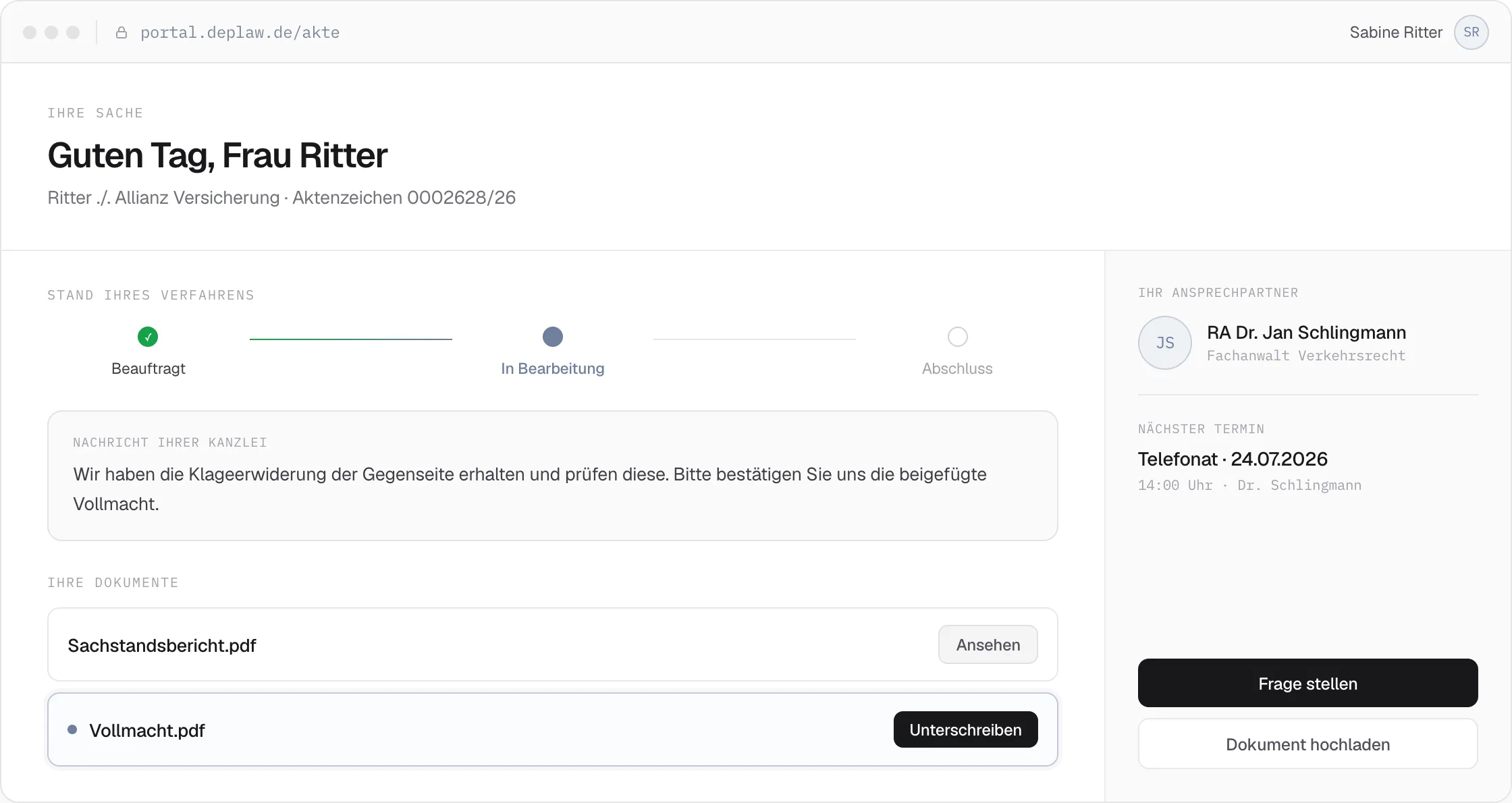
The online case file is the central digital space for collaboration between firm, legal department, and client – with direct, secure, always-available access to all relevant information on a case, with no media breaks and no additional third-party software. In it, clients see all incoming and outgoing documents, the current processing status, their contacts with contact details, open tasks for structured follow-up on the facts of the case, as well as powers of attorney and releases for digital signature. Communication shifts as a result from unwieldy email traffic into a clear, traceable, and secure process space.
The online case file isn’t just a place to store documents — it’s an interactive working tool: clients submit information in a targeted way via dynamic forms, raise questions directly within the case, and complete structured tasks instead of answering unclear queries by phone or email. Feedback flows directly into the ongoing process and can be further processed immediately with artificial intelligence if needed.
Fully mobile-optimized, with no app required
The online case file is fully usable in the browser – with no installation and no technical hurdles. Whether on desktop, tablet, or smartphone: clients can review their documents on the go, complete tasks directly from their smartphone, sign powers of attorney on the touchscreen, and upload photos immediately with their phone’s camera. Anyone who prefers can also use the online case file as a dedicated iOS and Android app.
An integrated part of the platform, not a separate portal
Unlike a separate case portal, the online case file is a fixed part of the same platform on which the case is also handled: no additional interfaces, no duplicated data, no synchronization between separate systems. Documents are available in real time, releases happen with a single click, and tasks as well as follow-up questions run in a structured way within the same process instead of through additional tools or email traffic.
01
Access documents anytime
All letters and notices are available in the online case file immediately after release by the firm – from anywhere, around the clock.
Browser-based · No download
02
Sign powers of attorney digitally
Legally valid signatures directly via touchscreen – no printing, no scanning, no mailing.
Touchscreen · Legally valid
03
Upload photos & submit documents
Take and upload photos directly with a smartphone camera. Receipts, contracts, and evidence are assigned to the case immediately.
Camera integration · Instantly available
04
One-click login
Registration and sign-in via Google, Apple, or Facebook – no new passwords, no access barriers for clients.
OAuth · No app required
Related Features
Pairs well with Online Case File.
Case File & Inbox
Inbox
Instead of separate systems per channel: beA, email, fax and the online case file all run through the same inbox – with the same automation for every message.
Case File & Inbox
beA Interface
Incoming beA messages are classified automatically, and hundreds of submissions can be sent in the same step, each with its own delivery report.
Case File & Inbox
Case History & Input Management
Full-text search, AI tags, and automatic filing from every channel turn the case history into a seamless, instantly usable case chronicle.